Question
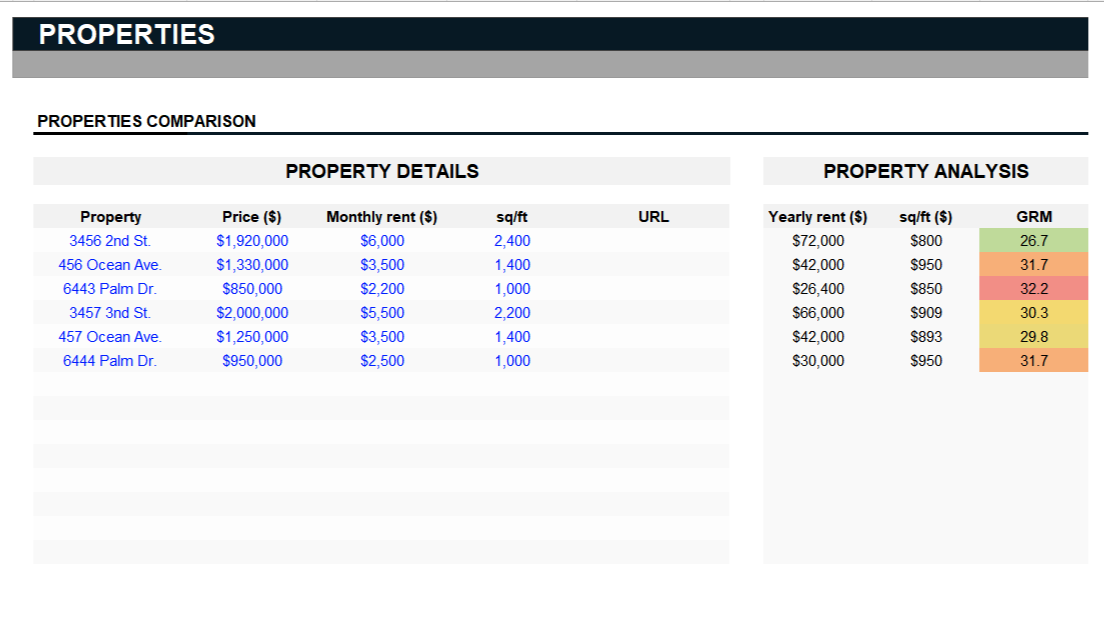
The "Training" tab assists in calculating the Average regional Gross Rent Multiplier (GRM) by providing a table where you can input data for up to six properties in the same region. By entering the relevant data for these properties, the template can calculate an average GRM for the region, providing a useful benchmark for comparing potential real estate investments.
This question was asked on:
The 'General information' section is where essential property details are entered, such as the purchase date, property value, and the number of units acquired. This section also requests the 'Average regional GRM'. The Average regional GRM calculates an average GRM for properties in the same region. To assist in its calculation, the template includes a table under the 'Training' tab where you can enter data for six properties in the same area to obtain the Average regional GRM.





Receive new free presentations every Monday to your inbox.
Full content, complete versions — No credit card required.